3D fashion design software: what it does and how to start
Every physical sample that comes back wrong costs a design team more than fabric and freight. It costs momentum. A pattern gets cut, prototype gets sewn and a week later the team learns that the sleeve hangs differently than the sketch predicted.
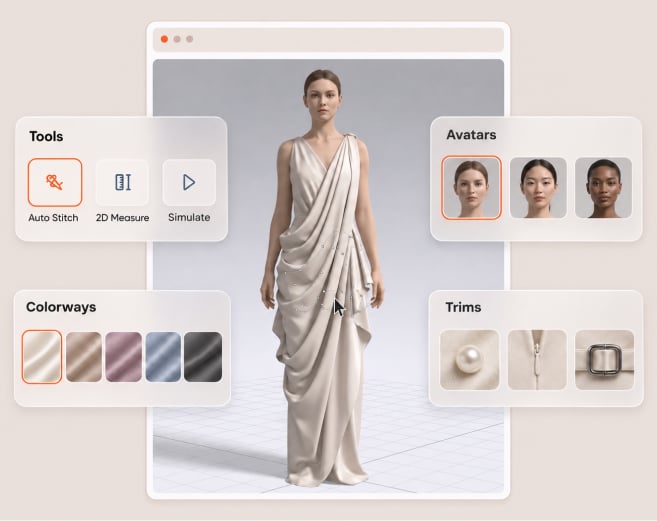
Designers use 3D fashion design software to build garments on 3D avatars digitally, test fabric and fit on screen, share the result so changes happen before a physical sample is cut. This guide explains what that software does for a design team; what changed in VStitcher 2026.3; what you need to run it; how learning works; where 3D does not replace physical work.
What 3D fashion design software does
This software brings flat and finished parts of garment development together in one workspace. Draft or import pattern pieces, drape on avatar, adjust fabric and construction then watch the garment react. Three capabilities decide whether it belongs in a design workflow: connectivity; accuracy; showcasing.
| Capability | What it does for a designer | What to check before you choose |
|---|---|---|
| Connectivity | Brings 2D patterns into a 3D workspace and sends files out for production | Pattern import and export, tech pack output, and how colleagues review the file |
| Accuracy | Simulates how fabric stretches, drapes, and moves on an avatar | How the vendor handles real fabric data |
| Showcasing | Presents the garment for review without a physical sample | Whether the output supports collaboration and selling |
Connectivity
Connectivity is when the 3D work fits the tools and people around it. VStitcher has a 2D drafting environment beside draping, imports DXF pattern files, exports patterns and tech packs for production documentation. Stylezone (Browzwear collaboration platform) syncs 3D prototypes to cloud, keeps full history of design updates and comments in one place.
Accuracy
Accuracy: the garment on screen behaves like the garment in the sample room. VStitcher simulates how fabric stretches, drapes and moves; designers fit it on customizable 3D avatars and grade it across sizes; Browzwear Fabric Analyzer measures bend, drape, thickness, stretch and recovery of the fabric itself then stores the results in U3M fabric file format.
Showcasing
Showcasing means the digital garment can carry a review, presentation or sales conversation. Colleagues review the 3D prototype and comment on it in Stylezone; VStitcher product page describes how to connect virtual samples to e-commerce sites.
What changed in VStitcher 2026.3
VStitcher 2026.3.0 (released October 30, 2026) contains three things that matter to designers:
- Points of measure in one table. Now formulas and points of measure share a table. A designer selects line or two points in the 2D window, saves value to formula, exports table to CSV for one size or all sizes. New tab in Sizes shows read-only measurements for each size.
- More control over static points. Set Static now gives X or Y or both as stacking axis; setting a symmetry piece static keeps grading and no longer distorts the contour and diamond marker shows each static point in 2D.
- Pattern piece color. Designers choose outline and allowance colors per piece from a nine color palette; set allowance opacity; turn on an X-ray view that makes piece fills semi-transparent to inspect overlaps. The colors change only the 2D display.
Version support matters for any team that shares files. VStitcher 2026.3 opens files from earlier versions but earlier versions cannot open 2026.3 files. Support is for VStitcher and Lotta version 2026.3, 2026.2, 2026.1 and 2025.3 so move every designer on a project to the same version before first handoff.
The upgrade path depends on the license type. Cloud license users send an upgrade request by email and attach no files. Dongle license users update their license by sending a C2V file by email. Renewals for 2026.3 go through the Customer Success Manager.
What you need to run it
Plan hardware before the first license ships out. The Browzwear help center has minimum and recommended specs for Windows and macOS. Look in there for the version you plan to install in the rows for processor, memory, graphics card and storage.
For macOS the help center has these requirements:
| Minimum | Recommended | |
|---|---|---|
| Operating system | macOS 15.4 Sequoia or later | macOS 26.1 Tahoe |
| Processor | Intel i7 with eight cores | Apple Silicon M1 or newer |
| Memory | 16GB RAM | 32GB RAM |
| Display | 1920x1080 | 2560x1440 |
Two limits apply on every platform. Browzwear does not recommend running VStitcher on virtual machines so install it on a physical laptop or workstation. Ray tracing is not available on macOS.
How long it takes to learn
Designers worry 3D will slow the team down before it helps. That is fair and the honest answer has two parts: Browzwear does not publish a fixed learning time so no one can promise you a number of weeks. The learning path itself is clear cut and runs at your own pace.
Browzwear University offers on demand VStitcher courses with lessons, quizzes and activities. They start from pattern shape basics to garment creation and rendering. Learners get a certification and employers see analytics for their teams progress. Everything runs virtually so designers learn between deadlines instead of leaving the studio.
A practical way to start:
- Pick one style that already has a finished pattern and a known fit.
- Rebuild it in 3D and compare the screen result with approved sample.
- Review the digital version with the design lead before cutting a new prototype.
- Add a second style once the first review goes smoothly.
That sequence protects the current workflow. The team keeps its physical process running but first digital review proves its worth.
What 3D replaces and what it does not
The 3D workflow replaces the early look-and-fit rounds that used to require a physical sample. Browzwear says designers can validate, iterate and approve designs in VStitcher without physical samples slowing things down: Each digital round happens on screen so change costs a few clicks not a new prototype.
It does not replace design judgment and it does not remove every physical check. A designer still chooses, sources and approves real fabric; where a team doubts that simulation captures a material then a physical sample is the final check. The 3D workflow shortens the path to that sample but does not forbid the sample.
Four signs your team would benefit from starting now:
- Designers wait for a physical sample before they can judge fit or drape.
- Revision rounds run the same fit comments from season to season.
- People review garments in photos and email threads instead of one file.
- Pattern, fabric and measurement data live in separate files nobody really trusts.
If two or more of these ring a bell, then first digital review gives the team a low risk way to test approach on one style.
How it compares with 2D CAD
Two-dimensional CAD draws flat pattern pieces and technical drawings. Software for 3D fashion design puts the garment on a body so that a designer can see drape, fit and fabric behavior before anyone cuts cloth. Pattern making is craft in both cases too. Pattern makers have what they know but the 3D view shows them how each change affects the finished garment.
| Question | 2D CAD | 3D fashion design software |
|---|---|---|
| What does the designer see? | Flat pattern pieces and drawings | The garment on a 3D avatar, plus the flat pieces |
| How does the team review fit? | Measurements and a physical sample | On-screen fit, points of measure, and a shared 3D prototype |
| What happens when the design changes? | Edit the flat piece and wait for a new sample | Edit the piece and watch the garment update |
VStitcher keeps a 2D window beside the 3D view so pattern work remains flat while garment is in 3D. See what 3D fashion design is at a basic level to see how it works. Teams who care about the environment can read about 3D apparel design and production.
FAQ
Q: What is the best 3D fashion design software?
A: It depends on whether the tool connects design to production. Pattern import and export, fabric accuracy, collaboration, version support, training. VStitcher is Browzwear 3D design software for teams that need that connection.
Q: Is 3D fashion design hard to learn?
A: It takes practice and Browzwear does not publish a learning time. Browzwear University is self-paced courses with lessons, quizzes and activities from pattern shape basics to garment creation and rendering. Start with one style and build from there.
Q: What computer do I need for 3D fashion design?
A: Use a physical laptop or workstation not a virtual machine. Mac minimum is macOS 15.4 Intel i7 eight cores 16GB RAM 1920x1080 display. Browzwear recommends Apple Silicon M1 or newer. Windows specs are on the Browzwear help center.
Key takeaways
- Designers use 3D fashion design software to build garments on 3D avatars and test fabric and fit on screen so changes happen before a physical sample exists.
- Assess any platform on connectivity, accuracy and showcasing.
- VStitcher 2026.3 adds a combined points of measure table, finer control of static point and pattern piece color.
- Files from 2026.3 open only in 2026.3 so keep a project team on one version.
- Install on a physical machine and remember that ray tracing is not available on macOS.
- Browzwear University gives designers a self paced path from pattern basics to garment creation and rendering.
- The 3D workflow reduces the route to a sample. It does not eliminate the final physical check.
See how your design team can review a garment digitally before cutting a physical sample.
