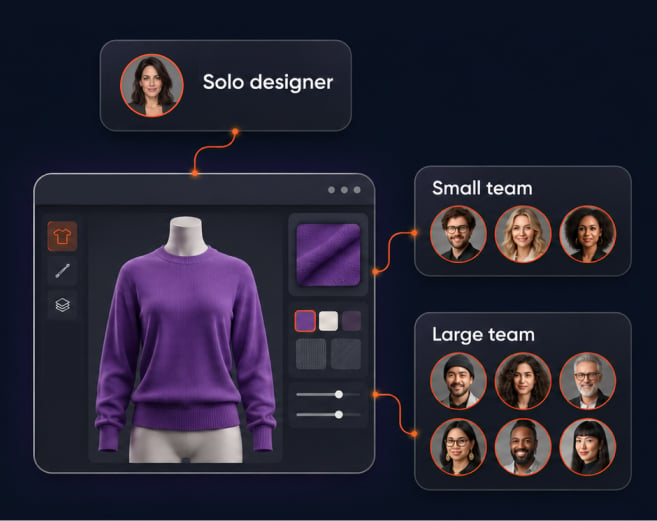
Apparel design software: a buyer's guide by team size
The right apparel design software depends on team size: freelancers, small teams and enterprises all need to check seats, software versions, cloud rendering and support before buying.
Most guides rank tools and skip that part. The cost comes later. A plan that’s too small stalls the first time a second designer joins; a plan that’s too large charges for capacity the team won’t use this season. Either mistake delays collection.
This guide starts with your team not a tool list. It tells you what each size of team needs, gives a checklist that works with any vendor and who each Browzwear plan suits. To see it organized by workflow stage read our guide to fashion design software by workflow stage.
What apparel design software covers
Apparel design software covers the tools that turn a design idea into a garment file that everyone on the team can review - sketching, pattern making, 3D garment visualization, fit review and sharing for approval. No product covers every step equally well so first job is to name your gap.
Three categories matter most:
- Sketching and graphics tools produce flat artwork and concepts.
- Pattern tools produce the pieces a factory cuts.
- Tools that work in 3D (eg VStitcher) create a virtual prototype which teams review as a digital sample before anyone cuts fabric.
Online apparel design software and desktop software both fall in each category. The category matters more than the delivery method. A team looking for design software for clothing that ties creative work to development should start with 3D because a virtual prototype keeps one garment file in view from concept to approval.
There are free tools in the sketching and pattern categories. They can work for a solo designer but need the checks below anyway. Seats, versions and support matter at any price.
Match software to team size
Start with how many people open a garment file not how many design them. Technical designers, pattern makers and product teams all touch the same file.
| Team size | What the team needs | Check first | Common mistake |
|---|---|---|---|
| Freelancer | One designer with full control of every file | Hardware fit, software versions, learning resources | Paying for team features no one else will use |
| Small team | A few designers who share prototypes and feedback | Named seats, shared files, one place for comments | Passing files by email, which splits the history |
| Enterprise | Many designers, developers, and suppliers across seasons | Connections to other systems, version control, training at scale | Choosing for today's headcount instead of next season's |
Freelancers. A freelancer makes every decision so the risk is buying more than one person needs. Hardware requirements vs software versions first, then ask how quickly a new tool becomes productive without a colleague to teach it?
Small teams. A small team needs one place for the latest version and feedback from it. Browzwear Stylezone syncs 3D prototypes to cloud, stores history of design updates in full (comments too), so comments are collected in one place. Without that feedback goes into email threads and chat messages and the team forgets which version won approval.
Enterprises. An enterprise adds a coordination problem to many designers, developers and suppliers. The checks move from features to governance: who controls versions, how files get to other systems and how the company trains new users. Our guide to the eight enterprise criteria explains that evaluation in detail.
What to check before you buy
These five checks work with any vendor. Ask each one in writing and compare the answers side by side.
- Seats. Ask how many named users each plan covers and whether a seat can be moved from one person to another. Count everyone who opens garment files (not just designers). Technical designers and pattern makers too.
- Versions. Ask which versions of software the vendor supports and for how long. Browzwear currently supports VStitcher and Lotta versions 2026.3, 2026.2, 2026.1 and 2025.3. Version 2026.3 reads files from earlier versions but earlier versions can’t open 2026.3 files so plan to upgrade everyone at once. The VStitcher 2026.3 release notes give details.
- Cloud rendering. Ask if rendering runs in the cloud or on each designer’s machine and whether rendering counts against plan limits. A render that locks up a laptop costs design time. Read vendor published system requirements before committing hardware.
- Support and training. Ask what support each plan provides and how new users learn the tool. Browzwear University has VStitcher courses on demand with lessons, quizzes and activities; certification and progress analytics for employers; self-paced & fully virtual courses.
- Connections to other systems. Ask how files move into product lifecycle management (PLM) and whether the vendor publishes open interfaces for other tools.
Prices change often so check each vendor’s pricing page rather than using a guide. Compare plans on the same five checks not on the headline plan name.
Browzwear plans: who each is for
Browzwear has four plans: Freelancer, FreelancerPlus, Teams and Enterprise. This section describes who each plan is for and no prices are stated.
- Freelancer is for an independent designer who works alone and needs professional 3D tools (personal projects or client work)
- FreelancerPlus is for an independent designer who has outgrown the Freelancer plan and needs more from the same one-person setup.
- Teams work best for a small group of designers who share prototypes, feedback and version history.
- Enterprise is for larger organizations (many users, connected systems and supplier networks).
Plan details change so check current limits on the Browzwear plans page before you decide.
Choose for the next two seasons, not just this one. A team that expects to double its designers should ask how a move between plans works before it signs - that question removes the fear of buying a plan too small to grow with the team or too large for where the team is today.
When a team needs enterprise features
A team moves toward enterprise features when the problem stops being the garment and starts being the organization. Five signals indicate that:
- Several design teams (or sites) work on the same collections.
- Suppliers and developers need the same digital files as design team.
- Files must connect to product lifecycle management (PLM) or other systems.
- The company needs to train many users and track their progress.
- Version control across teams has become a daily source of rework.
Browzwear Open Platform connects through open APIs and supports PLM integration, batch processing and rule-based automation. Browzwear University adds progress analytics for employers (so a training lead can see who has completed which course). Stylezone stores the design history that approvals rely on.
If two or three of these signals describe your team today, ask for an enterprise evaluation now rather than after the next season starts.
FAQ
What is apparel design software?
Apparel design software is the set of tools that turn a design idea into a garment file team can review and approve. It includes sketching, pattern making, 3D visualization, fit review and sharing. Products vary on which steps they cover so name your gap before you compare tools.
What is the best apparel design software for a small team?
The best choice shares files, history and comments in one place; it covers everyone who opens a garment file. Count named users first then compare plans to that number Browzwear’s Teams plan is for small groups Check limits on the plans page
Can a freelancer use professional 3D software?
Yes, if the plan and hardware fit together. Browzwear has Freelancer and FreelancerPlus plans for independent designers. Check system requirements and plan limits first. Browzwear University is self paced so a freelancer can learn without a team.
What affects the cost of apparel design software?
The number of users, plan tier, software version and training all have an impact on cost. Each vendor sets its own terms so check each vendor’s pricing page, see the Browzwear plans page for current Browzwear plan details.
What should a team check before buying apparel design software?
Check five things: seats, software versions, cloud rendering, support and training and connections to other systems. Ask each vendor the same questions in writing. Match those answers to your team size and plans for the next two seasons.
Key takeaways
- The right apparel design software depends on team size so start with how many people open a garment file.
- Freelancers should focus on hardware fit, versions and learning resources instead of team features.
- Small teams need shared prototypes, one version history and one place for feedback.
- Enterprises should consider version control, system connections and training at scale.
- Five checks work with any vendor: seats, versions, cloud rendering, support and system connections.
- Choose a plan for the next two seasons and ask how moving between plans works before you sign.
- Check the vendor’s own pricing page (not ours) because plan details change.
Next step
See how your design team can review a garment digitally before cutting a physical sample.
