Streamlining Apparel Development: Cut Wait Times, Not Staff
Compress the apparel development calendar by removing wait time at three approval checkpoints. A framework for Product Leaders, with no added...
Sending every color decision to a physical lab dip burns calendar time on calls a screen can settle. Approving the wrong call on screen burns more: rework that erases every day you saved.
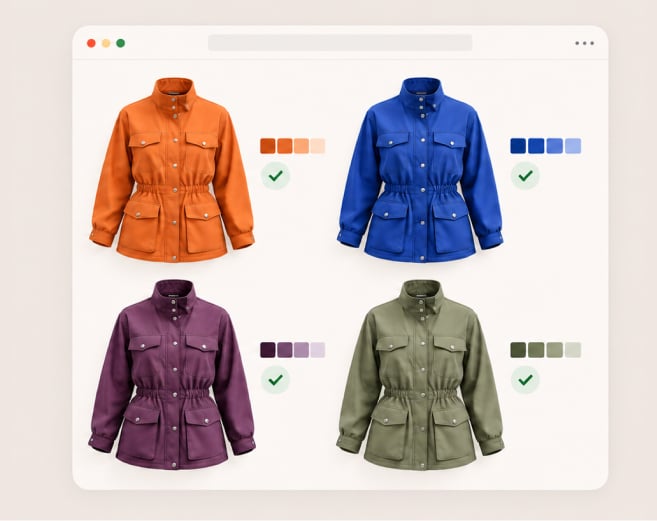
Digital color approval works when you know which call is which. Design Leaders can approve colorway combinations, placement, and print scale on screen based on measured fabric data, and reserve physical checks for shades that need a physical standard.
Most apparel brands treat color as a decision. At least four, that’s all: which colors are right together, where each one goes, how large a print reads and if this is the same shade as the standard. Legacy workflows send all four through the same physical loop of lab dips, strike-offs and sample rounds and every new colorway adds to the process.
The first three answers are well answered by screens. The fourth is different. The exact shade identity depends on dye, pigment, fabric surface, light source, and display calibration. Two colors can match under one light and then separate under another light and it's a metamerism problem that is then different for a screen to be able to predict, and the screen cannot account for that difference.
And the result is a blunt team rule: if it involves color, make a physical sample. That rule protects shade accuracy, and it also holds back every decision that never needed a physical check. Perry Ellis International says it shortened its apparel calendar by two months and cut salesman samples by more than 50% (source: Browzwear Fabric Analyzer page; the quote is not specific to color).
The framework sorts every color call into three lanes. Run each call through three questions, in order:
This lane is home to every relationship call. Approve these without a lab dip:
Fabric behavior matters here. A print scale that works on a flat swatch can read differently once fabric stretches, drapes and folds. Digital materials based on stretch, drape and thickness data let you judge scale and placement on a garment that moves like the real one.
This lane contains shades with a known target: a shade from a standard color library, a carryover from a prior season, or a variant within an approved color family. Approve on screen and then confirm once against the first physical production sample. One check replaces a full lab dip round.
This lane holds the shades where a screen cannot carry the decision. Send these to the lab first:
Lane three is short by design. Physical rounds go only where they protect something.
The outcomes below are directional and draw on capabilities described on Browzwear pages.
| Browzwear capability | Operational change | Business outcome |
|---|---|---|
| Fabric Analyzer measures stretch and recovery, bend and drape, and thickness | Teams judge placement and print scale on a digital garment that behaves like the real fabric | Fewer physical rounds spent on blocking and scale calls |
| Coloro library in VStitcher, 3,500 colors | Designers pick shades from a shared digital reference instead of a swatch card | Fewer shade disputes between design and production; Browzwear states the integration reduces production error risk |
| Stylezone Colorway Generator recolors selected styles from a palette, up to 100 colors per session | Teams generate the review set from a palette instead of building each colorway by hand | More combinations reviewed per collection without added headcount |
| Open Platform builds all color combinations from a color library | New colorways arrive in a print-ready tech pack format, stored in the file | Shorter path from approved palette to review-ready assets |
For the mechanics of colorway automation, see the colorway and artwork automation guide.
The framework changes where color decisions happen, not who owns them. Design Leaders keep authority over the palette:
Open Platform connects Browzwear to product lifecycle management and production systems, so approved colorways flow downstream without manual re-entry. The lab no longer receives every shade. It receives only the shades that need a physical standard.
Some tools prioritize visual speed over production validation. They produce attractive renders with no link between the render and the fabric. Teams that approve on those renders find the gap at bulk, when rework costs the most.
Measurement-first color tools solve a different problem. They answer whether a shade matches a standard. They do not show whether a combination works on a specific garment, at a specific print scale, in a specific fabric. Design Leaders need both answers, in two different lanes.
Enterprise-grade color approval needs fabric data measured from the physical material, a shared color reference across design and production, and a clear rule for when a physical check overrides the screen.
The common hesitation: screen color will not match production, and the rework will cost more than the time saved.
The framework answers it directly. It never asks a screen to prove shade identity. Lane three keeps a physical standard for every shade where identity carries risk. Screen decisions stay where screens are reliable: relationships, proportion, and scale. Suppliers raise a second concern: will they accept a digital color workflow? Lane three leaves the supplier process unchanged for the shades that matter most, because those shades still travel with a physical standard. Lane one and lane two decisions come as approved colorways, which cuts the questions suppliers send back. Bonprix says that in some cases (especially in less complex product groups) production goes forward without physical samples at all (source: Browzwear Fabric Analyzer page).
Start with one capsule. Tag its shades, run the lanes, and compare physical rounds against the last comparable collection.
Digital color approval is when you sign off on color decisions on a 3D screen and not on a physical sample. It is best suited for relationship calls such as colorway combinations, placement and print scale, but also for physical shade identity checks.
Yes, for relationship calls. Combinations, color blocking, placement, and print scale hold on screen when fabric data comes from measurement. But high-risk shades still need a physical standard.
Brand signature shades, shades that must match across materials, dark or saturated shades, special finishes (metallic or high-sheen), and shades with a contractual tolerance.
A lab dip is a physical dyed swatch that confirms a shade against a standard. A digital colorway is a 3D garment recolored on screen to test combinations, placement, and scale. They answer different questions.
When most color calls are relationship calls, it’s worth the money. Physical rounds are only in the area of protecting brand or contract risk where they protect brand and contract risk and the rest goes to screen.
Design leaders can choose colorway combinations, put them on screen, and print scale on screen based on measured fabric data and reserve physical checks for shades that need a physical standard. Color is at least four decisions. Screen settles three. And there is an exact shade identity at the fourth level. Three questions are placed on each call: relationship or identity, reference or no reference and brand or contract risk are the first two. Lane one has no lab dips and only one verification. Lane two has one verification. Lane three starts with a physical standard. Colorway automation and a common color library expand the review set without adding headcount.
Perry Ellis International, for instance, reports a two-month shorter apparel calendar with Browzwear. See how a three-lane color sign-off fits your collection calendar in a live walkthrough built around your workflow.
