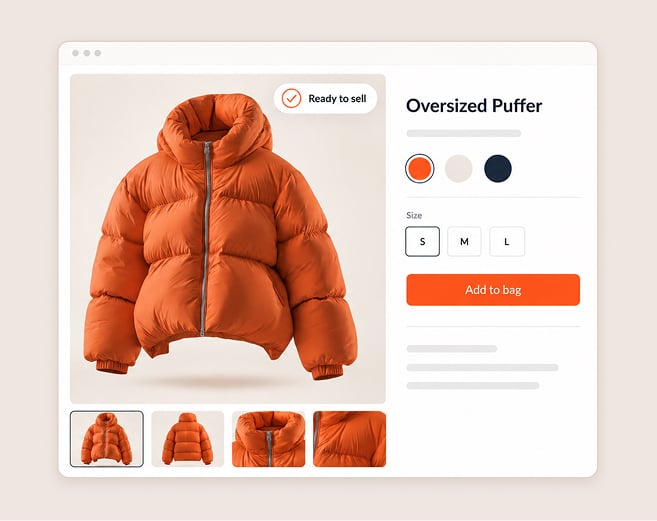
Digital samples for e-commerce: when are they ready to sell?
A product page goes live with a render. The garment comes back with a different drape, shade shifted or hem sits wrong. Return, markdown and shopper trust lost land on Merchandising not on the image.
Digital samples for e-commerce are only ready to sell if fit, fabric and color pass validation against the same file approved for production. Less than that is a picture of an idea not a picture of a product.
Why imagery and approval drift apart
Most retailers run imagery and approval on two tracks. Content builds images from a design file or early sample. Production approves another version (weeks later). Every change in between — revised pattern, swapped fabric, recolored trim — widens the gap between what the shopper sees and what ships.
Online launch dates push the other way. Virtual product images before production allows teams to publish earlier; Browzwear lists Launching product pages ahead of physical samples as a core Sell use case (Browzwear Sell page). But speed only pays off if the image is right. Early imagery without gate turns calendar win into returns risk.
Two words matter here. A digital sample is a 3D virtual garment built from the pattern, measured fabric data and an approved color. A render is an image taken from that garment. The render is as good as the sample behind it.
The five-gate readiness check
Pass every style through five gates in order. Each gate has an input and an output. A style gets imagery release only when all five pass.
- Version gate: is this the approved file? Input: the file version ID behind the render. Output: confirmation that the render source matches the version approved for production (if versions differ stop here).
- Fit gate: does the garment fit like spec says? Input: the graded measurements and fit review on a digital body. Output: a recorded fit approval for the style. Images built from an unreviewed fit show a garment no one has confirmed.
- Fabric gate: does the cloth behave like the real one? Input: measured fabric data (stretch, recovery, bend and thickness) applied as digital material. Output: drape and hand that read true on screen. Some fabrics still need a physical check so the fabric-by-fabric limits guide shows which ones.
- Color gate: is that shade approved? Input: a color reference for each shade. Output: each shade tagged approved or held for physical standard. The color sign-off guide describes which calls a screen can settle on.
- Detail gate: do construction and trim read correctly? Input: tech pack. Output: stitching, closures, trims and finishes in the image that match the spec — no detail invented by the renderer.
The release rule is simple. Five gates pass and Merchandising says style “cleared to publish”. One gate fails and the imagery for that style waits while all the other styles go on.
From capability to outcome
| Browzwear capability | Operational change | Business outcome |
|---|---|---|
| VStitcher virtual twin of the physical garment | Imagery comes from the same file that production approves | One version of each style online and in production |
| Fabric Analyzer measures physical fabric properties and applies them digitally | Drape and stretch on screen come from measured cloth, not from a texture swap | Fewer "not as shown" surprises and fewer fabric-related returns |
| Stylezone shared review | Merchandising, design, and vendors review the same digital style in one place | Faster clearance of the fit and color gates, with a visible record |
| Open Platform integration with adjacent systems | Cleared status and file version travel to downstream systems without re-entry | Cleaner handoff from approval to content to merchandising |
These outcomes are directional. Browzwear does not state a returns-reduction figure on the pages reviewed for this article so none is here.
The workflow with the gate in place
The gate is between approval and publication. Merchandising makes the release decision; digital file holds the evidence.
- Build the twin. The vendor or internal team creates the virtual garment from pattern and measured fabric.
- Validate. Fit, fabric, color and detail checks are run on the twin in a shared review.
- Approve for production. The validated twin becomes the version of record.
- Build imagery from that version. Renders are from the locked file, not a copy.
- Publish. Merchandising publishes the style online with file version attached to the asset.
- Reopen on change. Any post approval change to pattern, fabric or color opens the gate again and flags every image associated with that version.
Open Platform connects Browzwear to PLM and other systems so cleared status and file version style match. For multi-vendor portfolios the digital sample standardization framework shows how to keep submissions consistent.
Where good enough imagery creates risk
Some tools value speed of image creation over production validation. They create pretty images quickly but there is no link between the image and the measured fabric, graded pattern or approved shade. The shopper sees a garment that never gets instructions to be made in the factory.
Other approaches validate thoroughly but put imagery on its own track so a second render step adds another version. Either path has the same downstream risk: product page that no one can trace back to an approved file.
Enterprise-grade readiness has three things. The image must come from the file approved for production. Fabric data must come from measurement. Name of owner must hold release decision. Browzwear’s production validated twin is the single source for approval and imagery so what appears online matches what is approved for production.
Addressing the biggest doubt: will the product match the image?
This is the fear that kills most demo requests. Merchandising Leaders have seen images oversell, and the cost of a mismatch is real: returns, markdowns, complaints that go back to the buy.
The gate answers the doubt structurally. Imagery does not come from another artwork track. It comes from the validated twin and any change opens the gate again. A mismatch can still happen but it is traceable to a gate that failed, not an image that drifted unnoticed.
Production-side evidence is the same: Torben Böhm of Bonprix says “in some cases (less complex product groups) production can be moved forward without physical samples at all” (Browzwear Sell page). The qualifier matters here: less complex first. Start there.
Will vendors deliver files that pass the gate?
Vendor consistency is the next question for most Merchandising teams. Put gate criteria in vendor brief and ask for validated twin with every submission. Vendors that already work digitally get through fast and gate shows plainly which submissions need another round.
How long does it take to set up?
Start with one category and one season. Browzwear doesn’t publish a standard implementation timeline on the pages reviewed here, so scope the pilot with your team not an arbitrary number.
Frequently asked questions
What are digital samples for e-commerce?
Digital samples for e-commerce are 3D virtual garments that are used to create product page imagery before a physical sample is available. They’re ready to sell when fit, fabric and color pass validation against the file approved for production.
When is a render ready to publish?
A render is ready when it comes from the production file version and fit, fabric, color and construction details have all passed review. If any gate fails hold that style’s imagery.
What is the difference between a render and a digital sample?
The digital sample is the 3D garment built from pattern, measured fabric and approved color. A render is a single image taken from it. Sample carries product data; render only shows it.
Can virtual product images before production replace photography?
If styles pass all five gates then virtual images can launch a product page before the physical sample exists (Browzwear uses this as an e-commerce use case). Styles that fail one gate still need to be physically checked first.
Which products go through the gate first?
Less complex product groups clear first (Bonprix quote above). Complex fabrics, saturated shades and special finishes need more often to be checked physically.
Is this worth the effort for Merchandising Leaders?
It pays off when early launches carry mismatch risk. The gate adds a short review per style and gives Merchandising a traceable, named release decision for every product page.
Key takeaways
- Digital samples for e-commerce are sold when fit, fabric and color pass validation against the file approved for production.
- A render is only as good as the digital sample behind it so validate the sample, not the picture.
- Five gates decide release: version, fit, fabric, color and detail. One failure holds that style not the whole range.
- A single validated twin should be used for approval and imagery so the online product matches the approved product.
- Any change after approval opens the gate again and flags every image that was tied to that file version.
- Merchandising should make the “cleared to publish” decision because returns and markdowns land on the buy side.
- Pilot with less complex product groups first and then widen the gate as evidence builds up.
See the gate in your workflow
Browzwear works with more than 1,000 fashion and apparel companies around the world. See how a five-gate readiness check fits your launch calendar and vendor submissions in a live walkthrough that’s built around your workflow.
