3D clothing design online free: what you get, where it stops, and what comes next
Free fashion design software takes a designer further than most people think. Free tools can do sketching, pattern drafting and basic 3D visualization but each has limits that matter once a design gets to production. Browzwear also gives eligible students and recent graduates free six month Learner licenses. This guide shows what free covers at each stage, where the limits sit and how to tell when more is needed.
Search for 3D clothing design online free and you will find a lot of options but very little information on what each one produces. Time is money. A polished render does not help if a pattern maker cannot build from it; a pattern does not help if the manufacturer cannot read it.
What "free" really covers
The word free hides three different offers. Figure out which one you have before you build a workflow on it.
- Free with limits. The tool is free but the vendor reserves features, export options or output quality for paid plans.
- Free trial. Everything works for a short while then access stops. Files you create during the trial may not leave with you.
- Free for eligible groups. The vendor gives access to people who satisfy certain conditions (such as enrollment in a school program).
Every offer has license terms and commercial use is the line to find first. A tool that is free for learning is not always free for selling a collection so read the terms before you take on a client project.
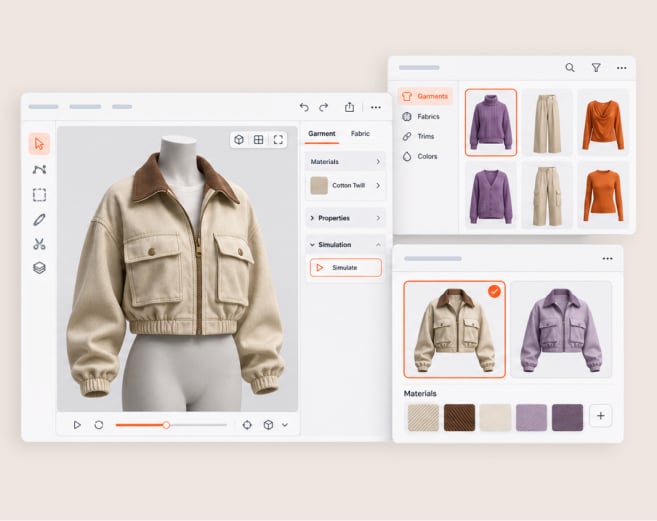
Know what you want the free tool to produce too. A 3D clothing design is a virtual prototype, a digital garment that you can view, rotate and review before anyone cuts fabric. A digital sample goes one step further because it stands in for a physical sample in a review. Free tools often do the first but not the second. That is the heart of this guide.
A free toolchain by stage
A garment goes through four stages before a factory can cut it. Free tools cover those stages unevenly so build your chain one stage at a time and check each hand off.
| Stage | What a free tool can cover | What to check before you rely on it |
|---|---|---|
| Sketching and concept | Flat drawings, mood boards, and color studies | Whether you can export clean vector or high-resolution files that a pattern maker can open |
| Pattern drafting | Basic blocks, seam allowances, and simple grading | Whether patterns export at true scale, with notches and grain lines, in a format other tools read |
| 3D visualization | A garment on a digital body, with simple fabric settings | Whether fabric behavior is adjustable, whether the body takes real measurements, and whether you can export the 3D file |
| Tech pack | Measurements, construction notes, and a bill of materials in a document or spreadsheet | Whether a manufacturer can read it without a call, and whether it matches the pattern |
Before you pick a free tool at any stage check four things on the vendor’s own site:
- License. Whether the tool is open source, free for personal use only or free for a trial period.
- For commercial use. Whether you may sell work made with it.
- Current downloads. Whether the latest version is free or only older releases.
- Exports. Which file formats leave the tool and whether other programs can open them.
Terms change so read the vendor’s current page on the day you start, not a summary from months ago.
Test any free chain with one simple garment:
- Pick a shirt or skirt, plain design please!
- Sketch it. Export the sketch as a file that someone else can open.
- Draft the pattern at true size, print one test page to check scale.
- Build the 3D version from that pattern not from a separate drawing.
- Write the tech pack from the pattern measurements and send it to someone who has never seen the project. Every question that comes back notes it down.
The 3D stage is hardest to judge because a garment on a screen always looks good. Judge it by what you can do with it afterward. Rotate the garment, change size and swap fabric. Then ask whether the pattern pieces underneath still behave.
Those questions are the limits of your toolchain. For a broader look at design tools across the workflow, check out our guide to fashion design apps.
What free tools cannot do for production
Production wants three things at once: one version of the garment, fabric behavior you can trust and a hand-off manufacturer can act on. A chain of separate free tools struggles with all three.
One version of the garment. You carry the design from tool to tool by hand in a chain of separate tools. Each transfer is a place where a measurement changes or a seam shifts. Sketch, pattern and 3D garment drift apart and nobody notices until sample arrives.
Fabric you can trust. A 3D garment predicts a real one only if the fabric settings match the real fabric. Basic settings look believable. Production decisions need behavior you have checked against a physical swatch. Browzwear’s Fabric Analyzer takes that approach because it measures bend, drape thickness stretch and recovery of a real fabric and stores those results in U3M fabric file format.
A usable hand-off. A manufacturer needs measurements, construction details and patterns to agree with each other. Any gap is a question mark; every question adds a sampling round that you pay for in time.
None of this means free tools are a bad choice for learning or early exploration. It means a free chain works best before the garment has deadline and supplier.
Free for students: the Browzwear Learner license
Browzwear has its own free route for people still learning. On the Browzwear plans page it says students in accredited programs and graduates within six months of graduating can apply for a free six-month Learner license with core Freelancer functionality.
Three limits to know before you apply. It is for non-commercial use (so it applies only to coursework and personal projects not client work), it has limited features (plans page does not list them) and it requires preapproval so you apply first then Browzwear starts when it approves you. Read the terms on Browzwear plans page then click the link there.
When to move to a paid plan
Move when the cost of the gaps passes the cost of the tool. Four signs tell you it is time:
- A client or manufacturer asks for production-ready files.
- You redraw the same garment in more than one tool.
- Your 3D fabric looks different from the physical sample.
- Suppliers send back the same questions on every style.
Compare the Browzwear plans to see which one works best for you and how you work. VStitcher is Browzwear’s 3D garment development software.
Browzwear University will get you ready first. It has on-demand VStitcher courses with lessons, quizzes and activities and certification. The courses are self paced and fully virtual so you can learn around client work.
Common mistakes
- Judging a tool by its render. A good image says little about whether the pattern under it is sound. Check the pattern and export first.
- Skipping the license terms. Commercial use rules vary by tool. Read them before the first paid project.
- Mixing tools without a file system. Name files by style, version and stage from day one. Otherwise you lose track of which pattern matches which render.
- Trusting default fabric settings. Compare the 3D garment with a physical swatch of the real fabric before you share it.
- Waiting for the manufacturer to test your hand-off. Run the five step test above with a friend or colleague and fix the questions that come back.
FAQ
Is there free 3D clothing design software?
Yes, but many free 3D tools are designed for general 3D work not garments. You bring in pieces of pattern and set fabric behavior yourself. Check export options and commercial use terms because those two limits decide whether the work will get to a manufacturer.
Can I design clothes online for free?
Yes, for early work. There are some free tools that run in a web browser and sketch and basic patterns; check if patterns arrive scaled and graded (a manufacturer needs both), and expect extra steps if not.
Who qualifies for the Learner license?
Students in accredited programs and graduates six months out of school can apply. Browzwear’s plans page says license is for non-commercial use, limited features included and pre-approval required so you apply first then wait to start.
What is the best free fashion design software for beginners?
Start with the stage you need most. Pick one free sketching tool and one free pattern tool; keep the first garment plain. Export files other programs can open so your work stays portable.
Key takeaways
- Free fashion design tools include sketching, pattern drafting and basic 3D visualization. Each has limits that matter when a design makes it to production, but all of them do.
- Free comes in three forms: free with limits, free trial and free for eligible groups. Know yours before you commit.
- Browzwear gives students and graduates eligible for a free six-month Learner license (non commercial use only) which makes a free first step into production grade 3D.
- Read the commercial use terms first. A tool that is free for learning may not be free for selling.
- Try any free chain on with one plain garment and every question a stranger asks about your tech pack.
- Chains of separate tools struggle with three production needs: one version of the garment, trusted fabric behavior and usable hand-off.
- Switch to paid when gaps cost more than the tool and learn the software first through Browzwear University.
Take the next step
See how your design team can review a garment digitally before cutting a physical sample.
