Interpreting Tech Packs That Were Never Built for 3D
Technical designers: turn incomplete tech packs into a 3D-ready checklist. See which fields manufacturers need before the build starts.
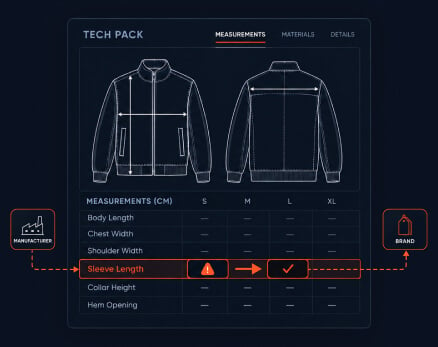
A technical designer who flags an incomplete tech pack and then waits has done half the work. The gap remains open, the style gets stuck and the brand client gets a complaint instead of a request. A technical designer closes the 3D-ready tech pack gap by sending the brand client a field-level request tied to a shared Browzwear file, converting a one-way complaint to two-way correction before cutting begins. In six steps, this guide provides a technical designer 3D-ready tech pack workflow.
Our earlier article, The technical designer's dilemma, showed how a tech pack built for a physical sample misses the construction and material behavior data a 3D build needs. Naming the gap is the first step. It is not the last.
Manufacturer and brand client file collaboration usually breaks down at the next step. Questions travel via email, free text and screenshots. The brand reads a list of problems, the technical designer reads silence and the style waits. The root cause is structural; the two sides do not have common reference for each other, so every correction is opinion on another document.
A shared file changes that. When both sides look at the same Browzwear file, a missing value is a visible empty field, not a judgment call. The message shifts from "your tech pack is incomplete" to "this field needs a value to complete the build."
Each step has a clear input and output so a technical designer can run it on the next style that arrives for the future.
Input: The brand client's tech pack and any digital files that came with it.
Action: Build the style in Browzwear and match what the tech pack provides to the file's fields for fabric behavior, construction detail, and point of measure values.
Output: A list of populated, partial, and empty fields.
Input: List of partial and empty fields.
Action: Label each gap as blocking, assumable, or cosmetic. Blocking gaps stop the build, such as a missing stretch value. Assumable gaps have a safe default your team can state openly. Cosmetic gaps do not affect fit or construction.
Output: A ranked list. Only blocking gaps go to the client first, so the first message is short.
Input: The blocking gaps.
Action: Name the field, state why the build needs it, and suggest a way forward. For example: “Fabric two needs to have a warp stretch value. Can you confirm the supplier test result or should we measure a swatch?”
Output: A request list with one field per line and no open-ended questions.
Input: The request list and the Browzwear file.
Action: Share the file via Stylezone, the cloud-based platform for reviewing and aligning styles so the client can see each empty field in context.
Output: Request and evidence travel together. The client answers from the same view the technical designer works in.
Input: The assumable gaps.
Action: Provide the assumption your team will build on unless the client objects by a given date. Log the assumption, the owner, and the date.
Output: A build that moves on while the client keeps control.
Input: The client's answers.
Action: Update each field, confirm the change back to the client, and note which answer solved which gap.
Output: A tech pack and digital file that agree and a record of what changed and why.
| Browzwear capability | Operational change | Business outcome |
|---|---|---|
| Structured fields for fabric behavior, construction, and point of measure values | Empty values surface at intake and relate to named requests | Fewer clarification rounds per style |
| Stylezone shared review | The client sees the gap in context and responds in the same way | Shorter client response time per request |
| Fabric Analyzer | The technical designer measures a physical swatch to provide missing fabric values | Fewer builds restarted after incorrect material assumption |
| VStitcher production-ready tech pack data | The corrected file gets returned to the client as data and not interpretation | Fewer interpretation errors between approval and cutting |
At intake, the technical designer maps the tech pack to the file and sends the first request list. The style does not wait for a complete document before work begins.
In the build, the technical designer answers fabric questions with measured values where a swatch exists. Fabric Analyzer tracks the physical fabric properties and applies them digitally to the virtual twin, so the manufacturer can often provide the missing data itself instead of waiting.
At approval, the client reviews the corrected file in Stylezone and confirms it. The same file supports production, as VStitcher tech packs contain production-ready data that reflects the physical garment, including fabric behavior.
For integration, Browzwear offers APIs and enterprise integrations with third-party applications through Open Platform, so teams can connect the workflow to the systems they already run.
Some tools put visual speed ahead of data completeness. A build may look good on screen and still have assumptions that come up at fit review or a sample ship.
Email threads and spreadsheets can point to a gap, but they cannot point to its location in the file. Without that location, each request stays a conversation instead of a correction. Enterprise-grade digital sampling needs a structure that holds up across dozens of styles and several clients, not one that depends on a technical designer remembering what to ask.
This hesitation is what most technical designers do not want to do, and it should be answered: a specific request is collaboration, and a general complaint is pushback. The difference lies in the wording and the evidence.
Three habits keep the tone collaborative:
Compare the two versions. Instead of "The tech pack is missing seam data," say "Seam allowance on the side panel is the one open field. We will build at the standard finish unless you send a different value by Friday."
At intake, brand clients also gain from this. A gap closed at intake costs them less than a sample rejected after it ships. That same few fields begin to look empty over a few seasons as the client learns what the build needs.
There are two secondary concerns that come next. First, will clients open a shared file? The request list does not require it, as Step 3 stands alone as a message, and the file link adds context instead of a need. Second, how long does adoption take? Browzwear's guide to upskilling pattern makers and technical designers cites six to eight weeks through Browzwear University.
A: A 3D-ready tech pack records fabric behavior, construction finish and allowance, and point of measure values in a form that a 3D build can read. A flat sketch and a measurement chart alone leave those inputs to assumption.
A: It is a six-step sequence: map the tech pack to the file, sort gaps, write one-line requests, share the file, agree on defaults and deadlines, and record the answers in the file.
A: It gives both sides one reference. The client sees the same empty field that the technical designer sees, so a request points to a location instead of describing a feeling.
A: No. Send blocking gaps first and handle assumable gaps through a default and deadline. A short first request gets a quicker and more complete answer.
A: Both sides touch it. The manufacturer's technical designer can’t rewrite the brand’s standards but can name each missing field and propose how to fill it.
A: Flagging reports that data is missing. Closing assigns a field, an owner, a default and a date, then records the answer in the file.
A technical designer fills the tech pack gap in a 3D-ready tech pack by sending field-level requests tied to a shared Browzwear file, making a complaint a two-way process before cutting starts. Flagging reports a gap. Closing assigns a field, an owner, a default and a date. Combining gaps into blocking, assumable and cosmetic keeps the first client message short and the build moving. The offer of each request, such as measuring a swatch, signals partnership instead of pushback. As a result, a gap at intake costs the brand client less than rejected samples after it ships. Recurring, specific requests influence what a brand client will include in future tech packs.
Manufacturers using Browzwear provide technical designers a single file to correct tech packs with brand clients before cutting begins. See what that looks like with your own client files.
