Instagram
Fashion Design Automation: Streamline Digital Design, Fit & Production
Discover how automation transforms digital fashion design with AI tools, tech pack automation, and smarter collaboration.
February 24, 2026
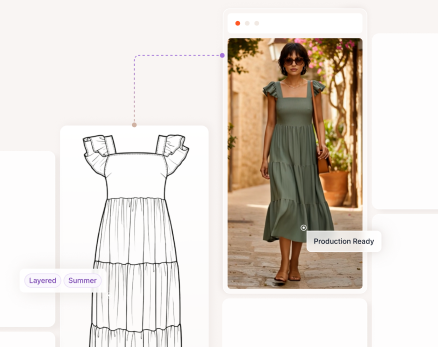
How can AI assist with digital fashion design? Moving from an initial sketch to a production ready garment is here. But what about producing results you can rely on? And what about considerations losing creative intent or speed-to-market?
With Browzwear solutions and Raspberry AI, these workflows become possible. Moving from concept to final assets with greater accuracy, consistency, and speed to market becomes a reality. For teams exploring digital fashion or curious about AI fashion design tools, this guide walks through the complete journey.
The accompanying video takes you step by step through the workflow. Below is an overview of each stage, from the first sketch through final visualization and production output.
For this example, in Browzwear’s software Stylezone, sketches are organized inside a seasonal folder so the entire team can access the material at any time. This shared workspace keeps everyone aligned early in the process.
To begin the design exploration, the sketch is uploaded to Raspberry AI using the Upload from Browzwear option, which connects directly to Stylezone. Designers add a prompt and Raspberry AI quickly generates several design variations. This stage is ideal for quick visual exploration, helping the team in this case to compare silhouettes and details before moving forward. Once chosen, the updated design is saved back to Stylezone as a new version.
With the updated sketch, you can continue by using Stylezone’s AI match to identify the closest matching blocks patterns as a starting point. This search looks at both visual characteristics and underlying pattern structure. Starting from a relevant block helps teams maintain pattern and fit consistency throughout the season.
Inside the style card, multiple reference views can be reviewed, and feedback can be added using Stylezone comments. This keeps communication in one place and prevents back‑and‑forth across platforms. When the style is ready for garment development and virtual garment prototyping, the Open Style in VStitcher feature launches the file directly in Browzwear VStitcher so the team always works with the correct version.
Once inside the Browzwear VStitcher fashion software, patterns are displayed in both 2D and 3D. Designers and technical designers can make adjustments such as shortening a hem, modifying lengths, or creating new pattern pieces using VStitcher virtual prototyping and apparel CAD software. Every adjustment in the 2D window instantly updates the 3D garment, so revisions can be evaluated in real time.
Fit can be assessed using pressure and tension maps. These visual maps highlight where the garment may need added ease or refinement. This step can be valuable for teams that require garment fit testing software, want to utilize 3D fashion design more or reduce physical samples.
With the pattern finalized, the next step is material selection. Designers can browse the digital fabric library software inside VStitcher. For example, reviewing various poplin options takes only a few clicks. Custom libraries can be brought in as needed, allowing teams to work with their own qualified and approved brand specific materials.
Colorways can be created using the existing color library or importing a custom seasonal palette. When working with all‑over prints, VStitcher allows designers to apply the artwork directly to the garment, adjust scale, and refine placement. This step often saves days or even weeks in the physical sampling process.
After materials and colors are approved, the final style is sent back to Stylezone for stakeholder review. With all feedback consolidated and the design confirmed, VStitcher can generate full production ready outputs. This includes a bill of materials, artwork placement details, measurement specifications, and DXF files for manufacturing workflows. Once approved, the garment can be visualized on Browzwear AI models. These AI‑powered models use true production patterns and fabrics, so proportions and fit remain accurate. The resulting renders are then published back to Stylezone for final review.
Here’s where your marketing team might step in. Marketing teams are able to generate accurate and brand compliant studio or campaign style outputs. A marketing team can elevate marketing or presentation visuals; designers can return to Raspberry AI with the approved renders from Stylezone. From here, for example, marketers can use different environments such as studio backdrops or outdoor scenes that can be applied. Accessories like bags or sunglasses can be incorporated to complete the look.
Raspberry AI includes an animation module, enabling you to create motion clips of the garment, adding possibilities for storytelling, and supporting workflows for ecommerce or internal presentations.
The coordination between Browzwear and Raspberry AI assists your team in collaborating more effectively, helping designers gain more room for creativity while technical designers maintain accuracy and consistency. Moving from sketch to production ready output becomes faster and more intuitive, supported by trusted tools that many fashion organizations already rely on.
To explore more about VStitcher garment design and its capabilities for sketch import, pattern editing, pressure and tension maps, colorways, and tech pack generation, visit the VStitcher page. You can also learn more about Raspberry AI and our growing network of PLM, DAM, merchandising, planning, AI solutions, and rendering technology partners on our Tech Partner page.
Learn More about VStitcher
Discover how automation transforms digital fashion design with AI tools, tech pack automation, and smarter collaboration.
Discover how Browzwear 2026.1 transforms digital fashion workflows with AI ideation, streamlined onboarding, and enhanced performance across all...
Shih Chien University’s talent program blends AI, 3D garment simulation, and sustainability with strong industry support from Browzwear.