The Result
-
Cleaner files
-
Fewer manual post-processing steps
-
Less back-and-forth with vendors
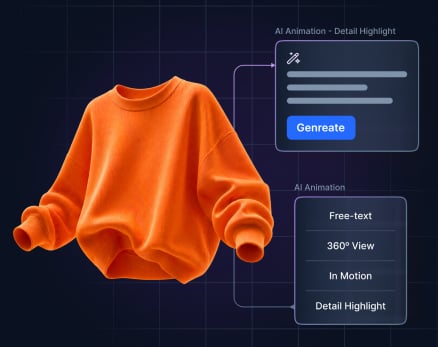
For the first time, designers can generate animated previews of their garments directly on the Stylezone Whiteboard - powered by Gemini AI, without ever leaving the collaboration canvas.
The workflow mirrors AI image ideation: select a garment or image, choose an animation type, configure resolution (720p or 1080p) and duration (4, 6, or 8 seconds), and generate. The result is an animated WebP delivered directly to the Whiteboard canvas, ready to share or present.
|
360° Animation |
Full rotation view of the garment from every angle. |
|
Garment Motion |
Catwalk, jog, or idle - see how fabric moves on the body. |
|
Detail Highlight |
Zoom-in animation to emphasize construction and finish details. |
|
Custom Animation |
Free-text prompt to generate any motion you can describe. |
For brands, this means faster buy-in from merchandisers and executives, stronger line presentations, and a new way to digitally validate drape and movement, reducing costly physical samples earlier in the process.
Animations export as GIFs for easy sharing across teams and stakeholders. They are read-only and auto-connect to their source prompt for traceability.
Note: The animation is a Credit-based feature - each generation consumes render credits from the account pool. Available to Enterprise and Teams on SSO. Feature flag controlled.
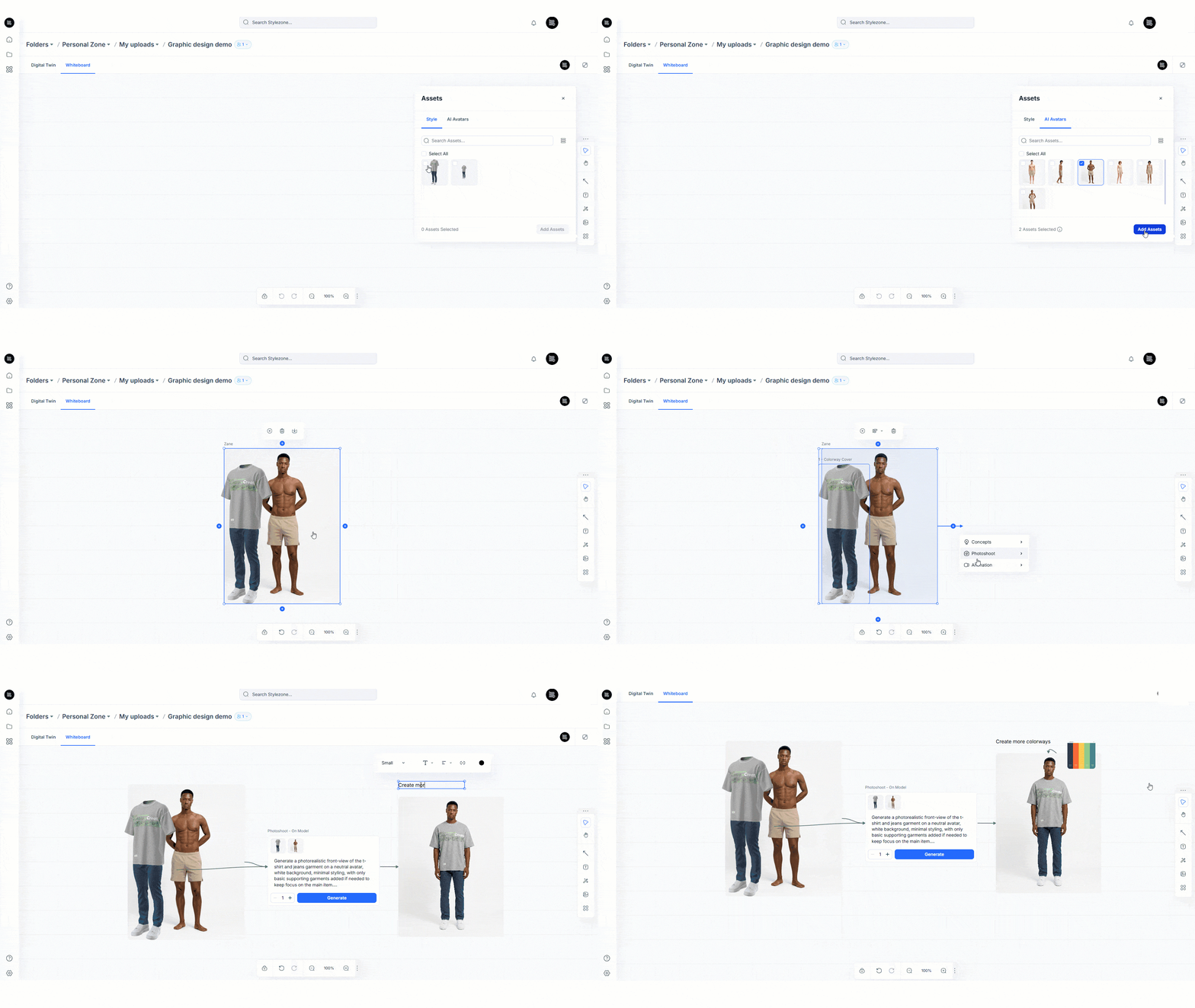
The Whiteboard continues to evolve as the hub for cross-functional collaboration. Six more improvements ship alongside Animation to provide a faster and more accurate process for Designers, Reviewers, Merchandisers
| Enhancement | What it does |
|
Add Image to Style |
Attach custom or AI-generated images directly to a style card, mood board, references, renders, and inspiration consolidated in one place. |
|
AI Avatars |
Six Browzwear AI avatars are now available in Whiteboard for fit and styling previews, consistent with the main style view. |
|
Text Node / Annotations |
Place formatted text directly on the canvas - callouts, fit notes, and design intent that persist for every collaborator in real time. |
|
Layering |
Control the stacking order of overlapping Whiteboard elements via right-click or toolbar. Stacking order persists across sessions. |
|
Real-Time Sync |
Element movements and resize actions are now synced live between all users; no page refresh is needed during collaborative sessions. |
|
Full Screen Mode |
A full-screen toggle hides navigation and side panels so the board takes center stage during presentations and client reviews. |
Automatic DPC (Dynamic Proximity Calculation) improvements deliver faster, more accurate garment simulation processing, with no user action required.
Export only the pattern pieces you need - no more manual cleanup of files before sharing with factories or downstream partners.
The Print to File dialog has been redesigned to give technical designers and pattern makers granular control over export output. Users can now include or exclude individual pattern pieces, choosing to export a subset as a separate file or as individual files, not both simultaneously.
The manual step of selecting Stylezone as a share target has been removed. The ‘Save and upload BW File’ option is now selected by default in the Share to Stylezone dialog window.
For teams running a VS → SZ workflow, this change eliminates one of the most common friction points: the need to remember to share the file along the renders. The garment files shared to Stylezone from VStitcher are now pushed to Stylezone by default, keeping the 3D garment and the collaboration canvas in sync without additional action.
This is an ecosystem enablement change - small in surface area, significant in daily impact for design and development teams working across both platforms.